
Step 1: Power & Cable Reset
- Check the Radar Cable connection: Ensure the J3 connector on the power board is fully connected.
- When looking into the machine from the top, the J3 connection is the top socket, closest to the back of the machine.
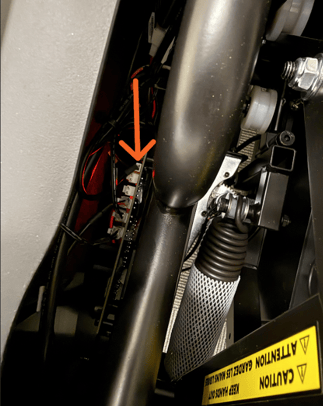
- If you are unable to see if from the top down view, you may need to remove the shroud. With the shroud removed, it is the top-left socket. Refer to the image below as a reference.
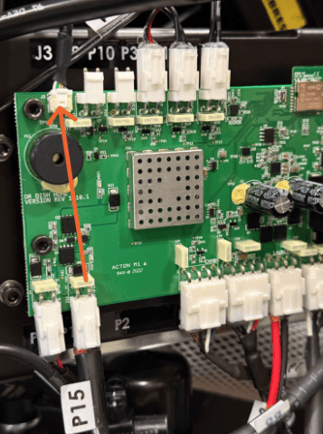
- When looking into the machine from the top, the J3 connection is the top socket, closest to the back of the machine.
- Power cycle: Unplug the machine completely from the wall.
- Wait: Leave it unplugged for one full minute.
- Restart: Plug it back in, power it on, and try using it again.
If the power cycle doesn't resolve the issue, you will need to test the Arc sensor manually.
⚠️ CRITICAL STEP: You must remove a ball from the lower feeder BEFORE starting the test in the software. If you initiate the test first and then grab the ball, the test will fail on the first attempt.
- Prepare: Take a ball out of the top of the lower feeder FIRST.
- Navigate to Diagnostics: On the tablet screen, go to More > Support > Diagnostics > Diagnostic Tests > Manual Arc Test.
- Take a Shot: Go ahead and take a shot.
- Listen for Confirmation: If the sensor is working, the arc should be detected and reported to you audibly (the machine will make a sound or voice announcement).
Step 3: Issues Persists
If the issue is still present we will need you to verify and provide your Support+ representative with the following information.
- Radar Firmware Version - This process has several settings selections needed to populate the Radar modules firmware.
- More > Support > Diagnostic > Visiontech Sensor > Sensor (press "Test" button) > Button will change to "Connecting" then to "Stop".
- Once it says Stop the packets are flowing > Select Data Packet Logs at the bottom > This opens a new screen > The Firmware Version listed on this page is the Radar Board Firmware, please take note of this number.
- Machine Software, Firmware, and Satellite Versions: These can be found at the following menu location: More > About.