
If your tablet displays a message stating it needs a firmware update, but the update hangs or gets stuck at 1%, this indicates two concurrent issues:
- The machine is not running the most recent software version.
- The radar cable has disconnected from the power board.
Because the radar cable is disconnected, the firmware update cannot communicate with the hardware, causing the progress bar to freeze. Follow the steps below to resolve the issue.
Step 1: Update the Software First
Before handling the hardware, we must ensure the tablet's core software is fully up to date.
- Action: Connect your machine to your wifi network or mobile phones hotspot to allow the Software Update to complete.
- Critical Note: Allow the machine to completely finish downloading and installing. Do not interrupt the process; let the tablet automatically reboot to finalize the software update.
Step 2: Reconnect the Radar Cable
Once the software update is complete and the machine has rebooted, we need to address the physical connection.
- Power Down: Unplug the machine completely from its power source.
- Reconnect: Locate the radar cable(J3) and securely plug it back into the power board.This connection can be accessed without removing the shroud from the machine.
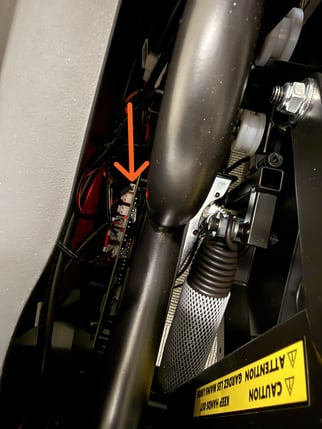
- Power On: Plug the machine back into the outlet and turn it on.
Once the software is updated and the radar cable is securely reconnected, the firmware error message will clear, and the machine will be ready for normal use.