
Tools Needed:
- 4 mm Hex Wrench
- Philips Head Screwdriver (shroud removal)
- Wire Cutters (Zip tie removal)
Video Instructions:
Written Instructions:
Removing the old Cable and Assembly:
- Remove your front left shroud using this guide.
- Locate the 6 bolts on the back of the radar housing.
- Using your 4 mm hex wrench, loosen each bolt a few turns.
- Important: The two middle bolts are slightly longer than the others. Keep track of which holes they came from.
- Once the bolts are loose, hold the front and back pieces together with one hand while removing the screws completely so the assembly doesn't fall.
- Remove the front cover of the radar, then disconnect the cable from the radar assembly. Press the locking tab on the bottom of the connector before pulling it free.
- Slide the radar assembly off the machine frame.
- Unplug the J3 connection from the power board.
- Cut the zip tie securing the cable.
- Remove the cable through the top of the lower feed pipe.
Install the Radar Cable and Assembly:
- Feed the new cable through the top of the lower feed pipe.
- Plug the cable into the J3 slot on the power board.
- Ensure the cables are behind the top-middle shroud screw, as shown in the image below.
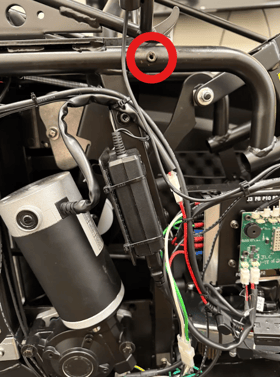
- Secure the cables with a zip tie. Do not tighten the zip tie too tightly.
- Tilt the new assembly downward, then slide it into the two frame pieces. Pull it forward to seat it into place.
- Reconnect the cable. Ensure the locking tab is facing downward. Push it into the socket until you hear a click.
- Secure the front cover. Hand-thread the two long middle bolts first.
- IMPORTANT: To avoid cross-threading the bolts, turn the bolt counterclockwise until you feel or hear a tiny "click" as the threads align. Then start to tighten them.
- Secure the remaining bolts. Install the corner screws loosely first, hand-tighten the middle bolts, then tighten the corner screws. Be cautious not to overtighten or cross-thread the bolts.
Firmware updates:
- Once the radar assembly is installed, power on the machine. If your machine is connected to Wi-Fi you may see an "Updating Firmware" prompt on the tablet.
- Allow the update to download and install. It will reboot on it's own so do not turn off the tablet.
- Once complete, follow the on-screen instructions: Power off the machine via the rocker switch, unplug the power cord, plug the power cord back in, and restart the machine.
- You may hear an audio sound as you unplug or plug in the machine. This is normal.
- You may hear an audio sound as you unplug or plug in the machine. This is normal.