
Required Tools
- 4mm hex wrench - For shroud removal
- #2 Phillips Head Screwdriver - For shroud removal
- 13mm wrench
- 6mm hex wrench
Video Guide
Written Guide
-
Release Tension: Move the distance rod all the way to the top so it is against the plate.
-
Disconnect Launch Arm: Manually push the launch arm down to take the tension off the grab arm hook. Lift the hook by hand and slowly release the launch arm so it is no longer connected to the hook.
-
Loosen Hardware: Use the 13mm wrench and 6mm Allen wrench to loosen the nut and bolt on the grab arm assembly. You only need to create enough "play" to slide the part; they do not need to be removed completely.
-
Remove Assembly: Lift the top pulley with one hand to clear the grooved rollers. With your other hand, wiggle the grab arm assembly and slide it off the launch motor drive shaft.
-
Align New Assembly: Identify the "key" on the motor drive shaft and the corresponding groove on the new grab arm. Ensure the small magnet on the grab arm is facing the launch motor (the inside of the machine).
- The key is a small metal piece in a groove on the motors drive shaft
-
Install New Arm: Lift the pulley again and slide the new assembly onto the drive shaft.
-
Set the Gap Distance: This is the most critical step. Position the grab arm so it is hanging approximately an 1/8" off the end of the drive shaft. An image of how close they should be can be seen below.
- Note: Do not press the grab arm flush against the end of the drive shaft. If it is too close, it will break the reed switch when the motor rotates.
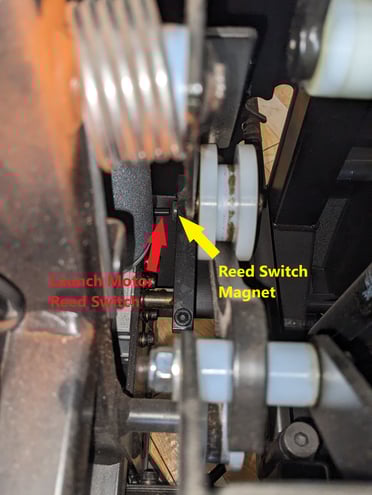
- Note: Do not press the grab arm flush against the end of the drive shaft. If it is too close, it will break the reed switch when the motor rotates.
-
Secure Hardware: While keeping the grab arm at the correct gap distance, firmly tighten the 13mm nut and 6mm bolt.
-
Plug in the machine and run a test cycle to ensure the motor fires and the reed switch correctly identifies the arm's position.
- Manually Testing Launch - Ensure that all Basketballs are removed from the machine as the machine may launch while going through this process. In the Dr. Dish Player App or on your machine's tablet, with your machine powered on, navigate to the following Menu location, More > Support > Troubleshooting > Diagnostics > Machine Commands. Select “Launch“ a single Launch action should occur. You may have to select this twice depending on the position of the launch arm at the time. Ensure you are paying attention to the Launch Switch status as well. This should change from Off to On and then back Off.
- Reinstall Shrouds
If you encounter any issues with the replacement process we’d love to assist you further! If you are already working with a representative please reply to them indicating the step you are getting stuck on. If you are not please start a support ticket here or you can call the Support+ Team at 612-412-4410!